
Legal & Professional Services
 Payroll Tools
Run payroll, hours, absence and holiday reports in a few clicks, from always up-to-date data.
%22%3E%3Crect width=%2212%22 height=%2212%22 fill=%22%23ecece6%22/%3E%3Crect width=%225%22 height=%2212%22 fill=%22%23d9d9d1%22/%3E%3C/pattern%3E %3Cfilter id=%22lift%22 x=%22-20%25%22 y=%22-20%25%22 width=%22140%25%22 height=%22160%25%22%3E%3CfeDropShadow dx=%220%22 dy=%2214%22 stdDeviation=%2216%22 flood-color=%22%23000%22 flood-opacity=%22.28%22/%3E%3C/filter%3E %3Cfilter id=%22lift-sm%22 x=%22-20%25%22 y=%22-30%25%22 width=%22140%25%22 height=%22180%25%22%3E%3CfeDropShadow dx=%220%22 dy=%228%22 stdDeviation=%229%22 flood-color=%22%23000%22 flood-opacity=%22.25%22/%3E%3C/filter%3E %3C/defs%3E %3Crect x=%2240%22 y=%2296%22 width=%22820%22 height=%22520%22 rx=%2222%22 fill=%22%23fff%22 filter=%22url(%23lift)%22/%3E%3Cpath d=%22M40 118a22 22 0 0 1 22 -22h776a22 22 0 0 1 22 22v32h-820Z%22 fill=%22%230d0d0d%22/%3E%3Ccircle cx=%2270%22 cy=%22123%22 r=%226.5%22 fill=%22%23ff5f57%22 /%3E%3Ccircle cx=%2292%22 cy=%22123%22 r=%226.5%22 fill=%22%23febc2e%22 /%3E%3Ccircle cx=%22114%22 cy=%22123%22 r=%226.5%22 fill=%22%2328c840%22 /%3E%3Ctext x=%22450%22 y=%22129%22 font-size=%2217%22 font-weight=%22600%22 fill=%22%23ffffffb3%22 text-anchor=%22middle%22 font-family=%22Poppins, ui-sans-serif, system-ui, -apple-system, 'Segoe UI', Roboto, sans-serif%22 %3ERotaOne%3C/text%3E%3Ctext x=%2272%22 y=%22200%22 font-size=%2224%22 font-weight=%22700%22 fill=%22%230d0d0d%22 text-anchor=%22start%22 font-family=%22Poppins, ui-sans-serif, system-ui, -apple-system, 'Segoe UI', Roboto, sans-serif%22 %3ELabour cost, Jan to Mar 2026%3C/text%3E%3Ctext x=%2272%22 y=%22246%22 font-size=%2218%22 font-weight=%22600%22 fill=%22%2377776f%22 text-anchor=%22start%22 font-family=%22Poppins, ui-sans-serif, system-ui, -apple-system, 'Segoe UI', Roboto, sans-serif%22 %3EHours worked%3C/text%3E%3Ctext x=%2272%22 y=%22290%22 font-size=%2234%22 font-weight=%22700%22 fill=%22%230d0d0d%22 text-anchor=%22start%22 font-family=%22Poppins, ui-sans-serif, system-ui, -apple-system, 'Segoe UI', Roboto, sans-serif%22 %3E21,480%3C/text%3E%3Ctext x=%22322%22 y=%22246%22 font-size=%2218%22 font-weight=%22600%22 fill=%22%2377776f%22 text-anchor=%22start%22 font-family=%22Poppins, ui-sans-serif, system-ui, -apple-system, 'Segoe UI', Roboto, sans-serif%22 %3ELabour cost%3C/text%3E%3Ctext x=%22322%22 y=%22290%22 font-size=%2234%22 font-weight=%22700%22 fill=%22%230d0d0d%22 text-anchor=%22start%22 font-family=%22Poppins, ui-sans-serif, system-ui, -apple-system, 'Segoe UI', Roboto, sans-serif%22 %3E%C2%A3268,400%3C/text%3E%3Cpath d=%22M80 503.5L820 503.5%22 stroke=%22%23efefe9%22 stroke-width=%221.5%22 /%3E%3Cpath d=%22M80 451L820 451%22 stroke=%22%23efefe9%22 stroke-width=%221.5%22 /%3E%3Cpath d=%22M80 398.5L820 398.5%22 stroke=%22%23efefe9%22 stroke-width=%221.5%22 /%3E%3Cpath d=%22M80.0 511.0L141.7 451.0L203.3 496.0L265.0 458.5L326.7 398.5L388.3 466.0L450.0 443.5L511.7 421.0L573.3 451.0L635.0 413.5L696.7 436.0L758.3 406.0L820.0 428.5L820 556L80 556Z%22 fill=%22%23f9a240%22 opacity=%22.16%22/%3E%3Cpath d=%22M80.0 511.0L141.7 451.0L203.3 496.0L265.0 458.5L326.7 398.5L388.3 466.0L450.0 443.5L511.7 421.0L573.3 451.0L635.0 413.5L696.7 436.0L758.3 406.0L820.0 428.5%22 fill=%22none%22 stroke=%22%23f9a240%22 stroke-width=%224.5%22 stroke-linejoin=%22round%22 stroke-linecap=%22round%22/%3E%3Cpath d=%22M80.0 488.5L141.7 466.0L203.3 481.0L265.0 436.0L326.7 421.0L388.3 451.0L450.0 428.5L511.7 406.0L573.3 421.0L635.0 391.0L696.7 413.5L758.3 376.0L820.0 398.5%22 fill=%22none%22 stroke=%22%230d0d0d%22 stroke-width=%223%22 stroke-dasharray=%229 7%22 stroke-linejoin=%22round%22/%3E%3Cpath d=%22M80 556L820 556%22 stroke=%22%23cfcfc8%22 stroke-width=%222%22 /%3E%3Ctext x=%2280%22 y=%22590%22 font-size=%2218%22 font-weight=%22600%22 fill=%22%2377776f%22 text-anchor=%22start%22 font-family=%22Poppins, ui-sans-serif, system-ui, -apple-system, 'Segoe UI', Roboto, sans-serif%22 %3EJan%3C/text%3E%3Ctext x=%22357.5%22 y=%22590%22 font-size=%2218%22 font-weight=%22600%22 fill=%22%2377776f%22 text-anchor=%22start%22 font-family=%22Poppins, ui-sans-serif, system-ui, -apple-system, 'Segoe UI', Roboto, sans-serif%22 %3EFeb%3C/text%3E%3Ctext x=%22635%22 y=%22590%22 font-size=%2218%22 font-weight=%22600%22 fill=%22%2377776f%22 text-anchor=%22start%22 font-family=%22Poppins, ui-sans-serif, system-ui, -apple-system, 'Segoe UI', Roboto, sans-serif%22 %3EMar%3C/text%3E%3Cpath d=%22M610 240L644 240%22 stroke=%22%230d0d0d%22 stroke-width=%223%22 stroke-dasharray=%229 7%22/%3E%3Ctext x=%22656%22 y=%22246%22 font-size=%2218%22 font-weight=%22600%22 fill=%22%23404040%22 text-anchor=%22start%22 font-family=%22Poppins, ui-sans-serif, system-ui, -apple-system, 'Segoe UI', Roboto, sans-serif%22 %3EPlanned%3C/text%3E%3Cpath d=%22M610 276L644 276%22 stroke=%22%23f9a240%22 stroke-width=%224.5%22 stroke-linecap=%22round%22/%3E%3Ctext x=%22656%22 y=%22282%22 font-size=%2218%22 font-weight=%22600%22 fill=%22%23404040%22 text-anchor=%22start%22 font-family=%22Poppins, ui-sans-serif, system-ui, -apple-system, 'Segoe UI', Roboto, sans-serif%22 %3EActual%3C/text%3E%3Crect x=%22619.8%22 y=%2240%22 width=%22304.2%22 height=%2266%22 rx=%2218%22 fill=%22%23fff%22 filter=%22url(%23lift-sm)%22/%3E%3Ccircle cx=%22658.8%22 cy=%2273%22 r=%2217%22 fill=%22url(%23a)%22 /%3E%3Cpath d=%22M19.5 12a7.5 7.5 0 1 1-2.2-5.3M19.5 4.5v4h-4%22 transform=%22translate(649.025 63.225) scale(0.814583)%22 fill=%22none%22 stroke=%22%230d0d0d%22 stroke-width=%222.6%22 stroke-linecap=%22round%22 stroke-linejoin=%22round%22/%3E%3Ctext x=%22687.8%22 y=%2280.56%22 font-size=%2221%22 font-weight=%22700%22 fill=%22%230d0d0d%22 text-anchor=%22start%22 font-family=%22Poppins, ui-sans-serif, system-ui, -apple-system, 'Segoe UI', Roboto, sans-serif%22 %3EAlways up to date%3C/text%3E%3Crect x=%22544.2%22 y=%22606%22 width=%22379.8%22 height=%2266%22 rx=%2218%22 fill=%22%230d0d0d%22 filter=%22url(%23lift-sm)%22/%3E%3Ccircle cx=%22583.2%22 cy=%22639%22 r=%2217%22 fill=%22url(%23a)%22 /%3E%3Cpath d=%22M12 4v11M7.5 10.5L12 15l4.5-4.5M5 19.5h14%22 transform=%22translate(573.425 629.225) scale(0.814583)%22 fill=%22none%22 stroke=%22%230d0d0d%22 stroke-width=%222.6%22 stroke-linecap=%22round%22 stroke-linejoin=%22round%22/%3E%3Ctext x=%22612.2%22 y=%22646.56%22 font-size=%2221%22 font-weight=%22700%22 fill=%22%23fff%22 text-anchor=%22start%22 font-family=%22Poppins, ui-sans-serif, system-ui, -apple-system, 'Segoe UI', Roboto, sans-serif%22 %3EExported in your format%3C/text%3E %3C/svg%3E)
Reports compiled from timesheets and spreadsheets are slow to build and out of date by the time anyone reads them. Managers wait for figures on costs, and payroll checks hours by hand.
RotaOne’s reports are built on the same data as the rota, the clock and the employee record, so they are always current. Choose the report, set the filters for the people and period you need, and export the answer in the format you choose.
What you can do
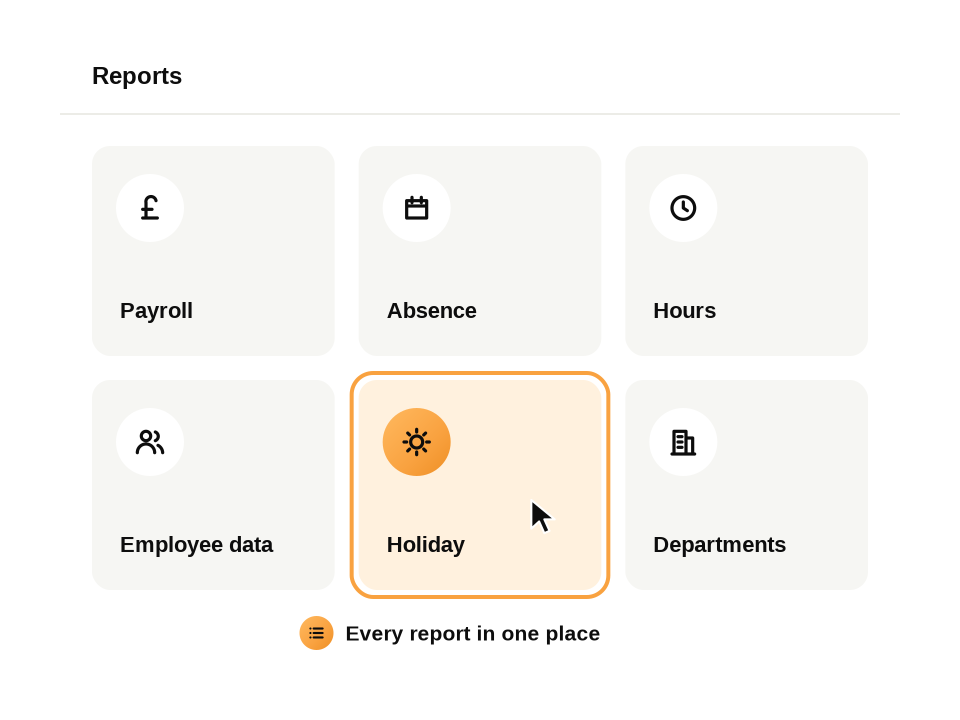

Payroll, absence, hours, employee data, holiday and department reports are all in one place, ready to run in a few clicks. Managers, HR and payroll each find the report they need without asking someone to build it.
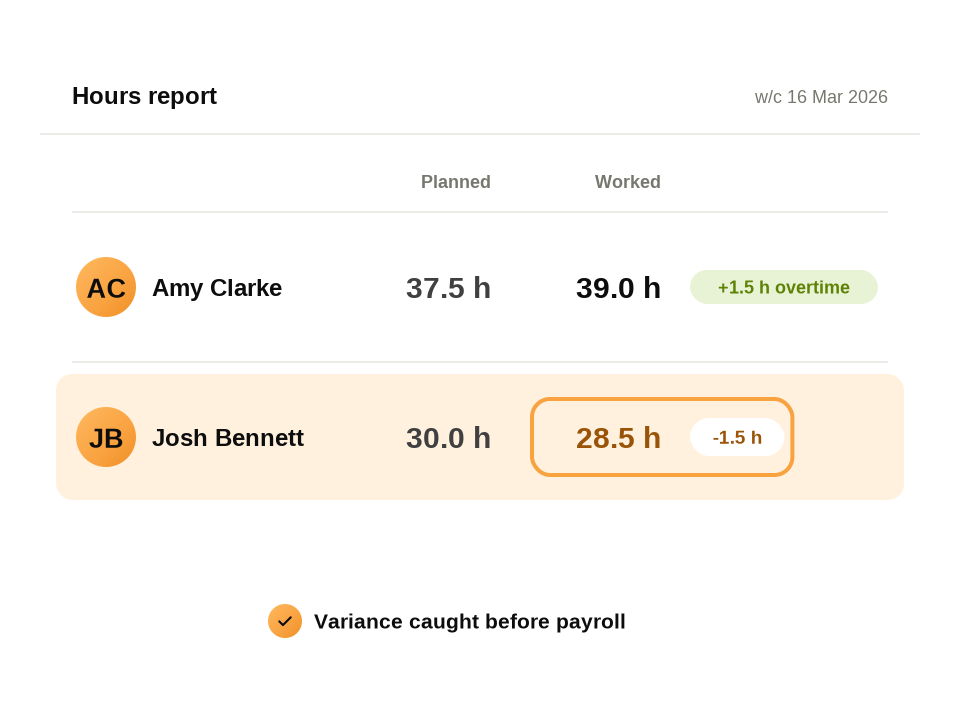

See planned, worked and overtime hours for every employee side by side. Variances stand out, so the hours that go to payroll are the right ones and managers can see where the rota and the day differed.
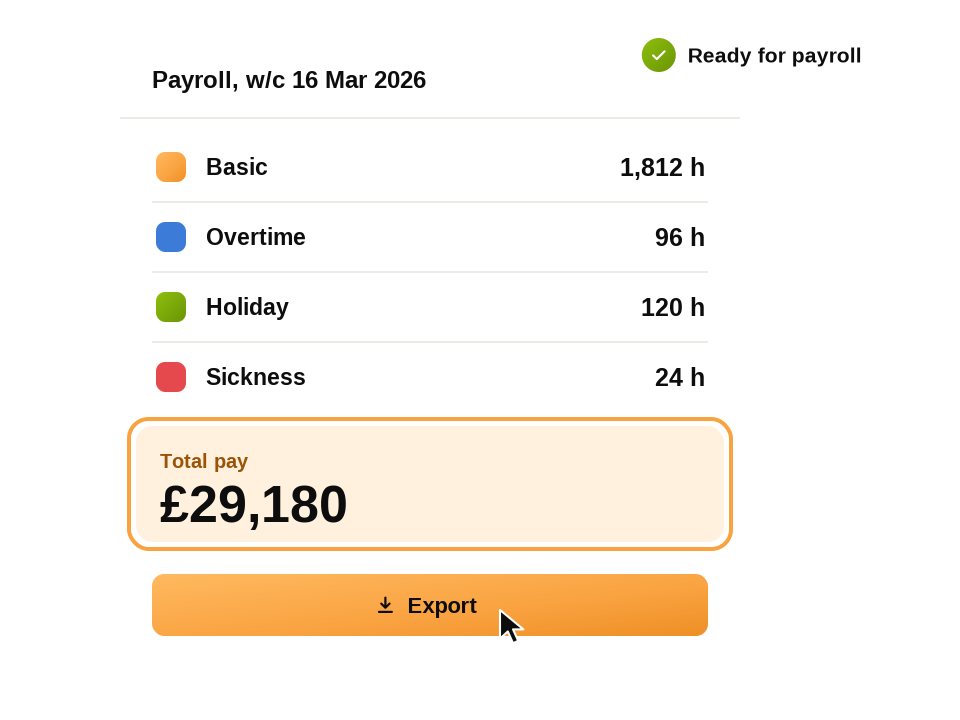

Produce a payroll report for the pay period with approved hours and pay, or a custom output for your payroll system, in a few clicks. It saves the admin time and the money spent on keying payroll in by hand.
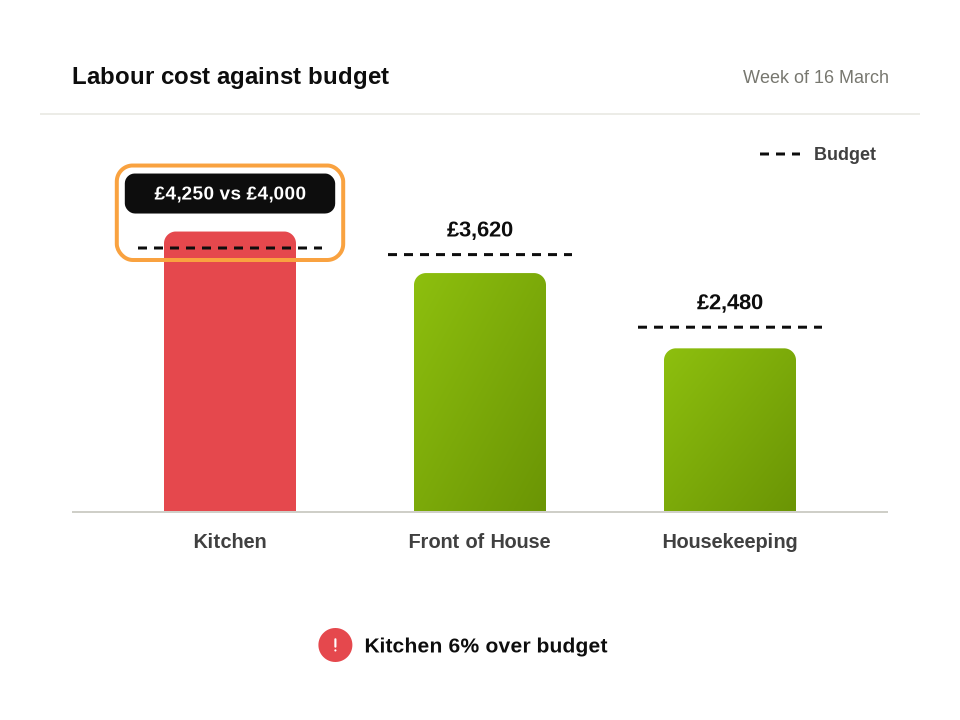

Put departments side by side and compare their hours and costs against budget for the period you choose. Costings run for an individual, a department or the whole organisation, so finance and managers see where they are on target and where they are not.
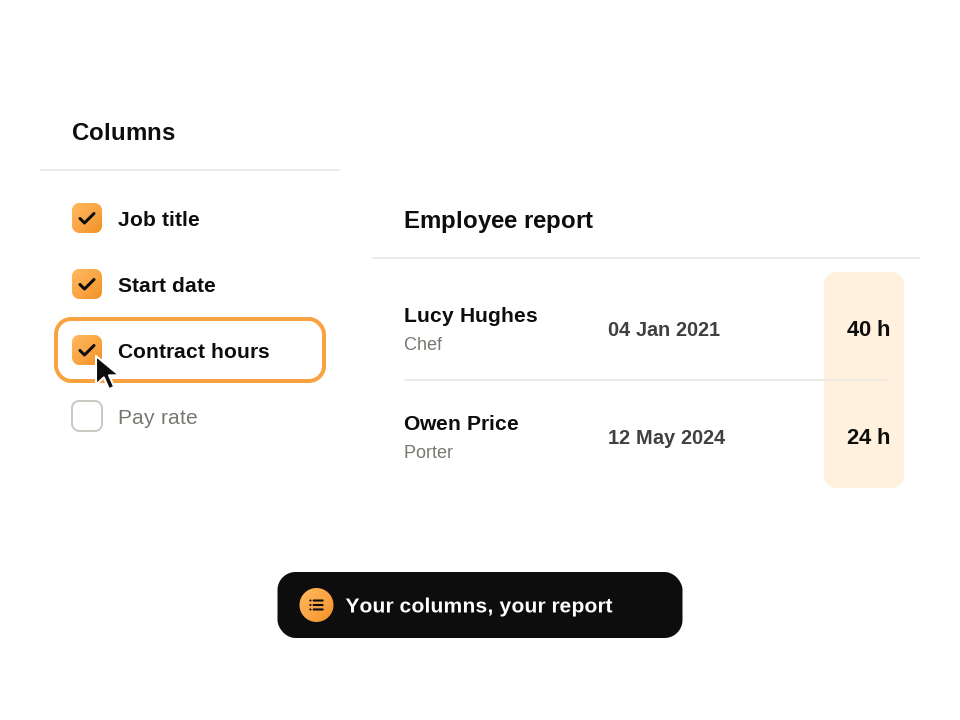

Pick the columns, filter the list and produce an employee report with exactly the data your HR team needs, from job titles and start dates to contract hours. It always matches the employee record.
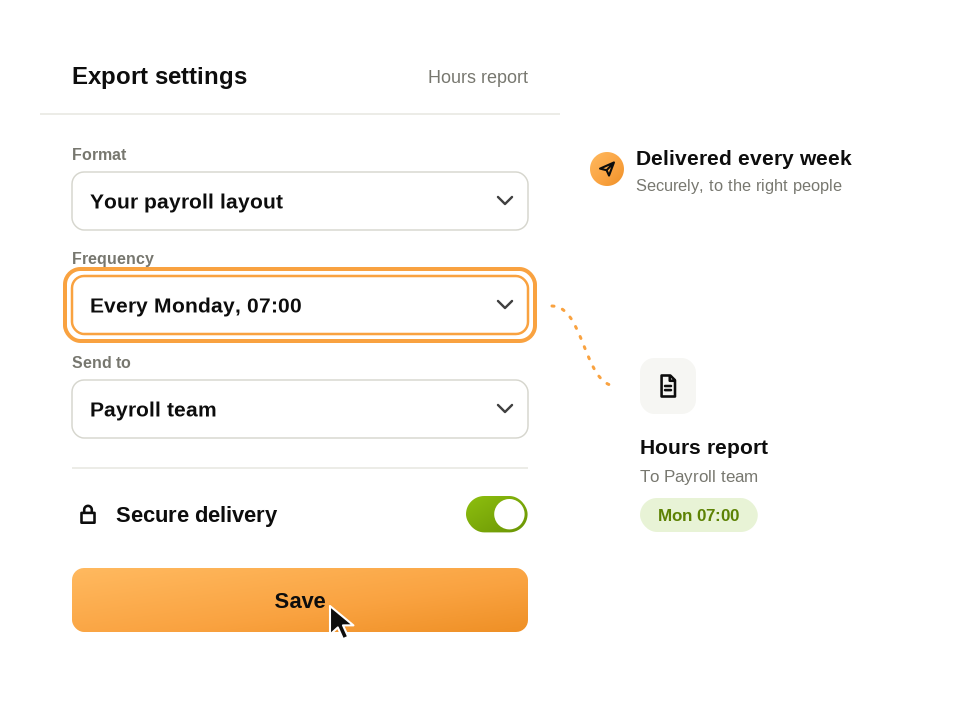

Take the figures into the systems and meetings that need them. RotaOne delivers custom outputs securely, in the format and at the frequency you choose, so nobody copies figures from one screen to another.
Can’t find the answer you need? Talk to our team on +44 (0) 1993 878 671.
Contact usPayroll, absence, hours, employee data, holiday and department reports, with costings for individuals, departments or the whole organisation. Each one runs in a few clicks with the filters you choose.
Yes. Reports are built on the same data as the rota, the clock and the employee record, so they reflect the latest clockings, absence and changes. There are no spreadsheets to compile.
Yes. RotaOne produces custom outputs for your payroll system and delivers them securely, in the format and at the frequency you choose. It also integrates with leading payroll providers such as Sage, Xero and ADP.
Yes. Compare planned and actual hours and costs for a person, a department or the whole organisation, and measure departments against budget. Managers see where they are on target and where they are not.
 Staff Rota PlannerPlan every shift, cost and absence on one screen, then publish the rota to your team’s phones.Learn more
 Shift PlanningBuild shifts and rotating patterns in minutes, stay within contracted hours and fill gaps fast.Learn more
 Staffing Levels & ComplianceRecord qualifications, set minimum staffing for key roles and be alerted before a shift runs short.Learn more

 Real-time DashboardsSee who is on site, and how hours and costs compare with budget, live as the day unfolds.Learn more
 Lateness TrackingTrack late arrivals, early leavers and overrun breaks against the rota, with managers notified.Learn more
 Intelligent RulesRounding, break, pay and contract rules automate the decisions your payroll team make by hand.Learn more

 Absence ManagementRecord every type of absence, spot patterns with the Bradford factor and pass it to payroll.Learn more
 Employee Self Service AppPut rotas, holiday requests, shift swaps and clocking in on every employee’s phone, in one app.Learn moreComplete HRKeep onboarding, forms, documents and contacts on one employee record, beside their rota.Learn moreComprehensive ReportsRun payroll, hours, absence and holiday reports in a few clicks, from always up-to-date data.You are here
 Smart IntegrationsConnect payroll, HR, access control and visitor systems so data moves without being keyed twice.Learn more
 Time Off PlanningPlan leave with clear entitlements, requests checked against balances and the rota in view.Learn more
We’ve been using Thinking Software for several years now, and it’s been a game-changer for our business.
 TinaHR Manager, Olympus Global
Join organisations using RotaOne for rotas, time and attendance, absence, HR and payroll. A product specialist shows you how it fits the way you work.

A walkthrough of the features that matter most to you.

Watch live attendance and rota updates as they happen.
See the key reports and how data reaches your payroll.

Watch rules and alerts take care of the routine tasks.

Ask your questions and ask about costs. No obligation.
Pick a date and time
Choose a slot for your live RotaOne demo.

Scan to bookthe RotaOne demo on your phone.
Loading the RotaOne calendar…
Prefer to talk first, or can’t find a time that works? Call +44 (0) 1993 878 671 or send us a message.
Hosted on Microsoft Azure, certified to ISO 27001 and Cyber Essentials Plus, registered with the Information Commissioner’s Office, and awarded a place on G-Cloud 15 as a Government Commercial Agency supplier.





From global manufacturers and public bodies to schools, hotels and care providers, these are some of the organisations that use RotaOne and Musterd.
Legal & Professional Services

Transport & Logistics

Transport & Logistics

Retail & Wholesale
Manufacturing & Packaging

Transport & Logistics

Entertainment & Leisure

Technology & Engineering

Entertainment & Leisure

Manufacturing & Packaging

Education & Training

Charity & Not for Profit

Transport & Logistics

Health & Social Care
Read case study: Somerset Care
Education & Training
Read case study: Glasgow Science Centre
Public Sector & Government